Financial AI® ResearchFactSet
Access Financial AI® Research Reports on FactSet
Financial AI® research reports are available through FactSet’s Document Search (DS) as a premium content source.
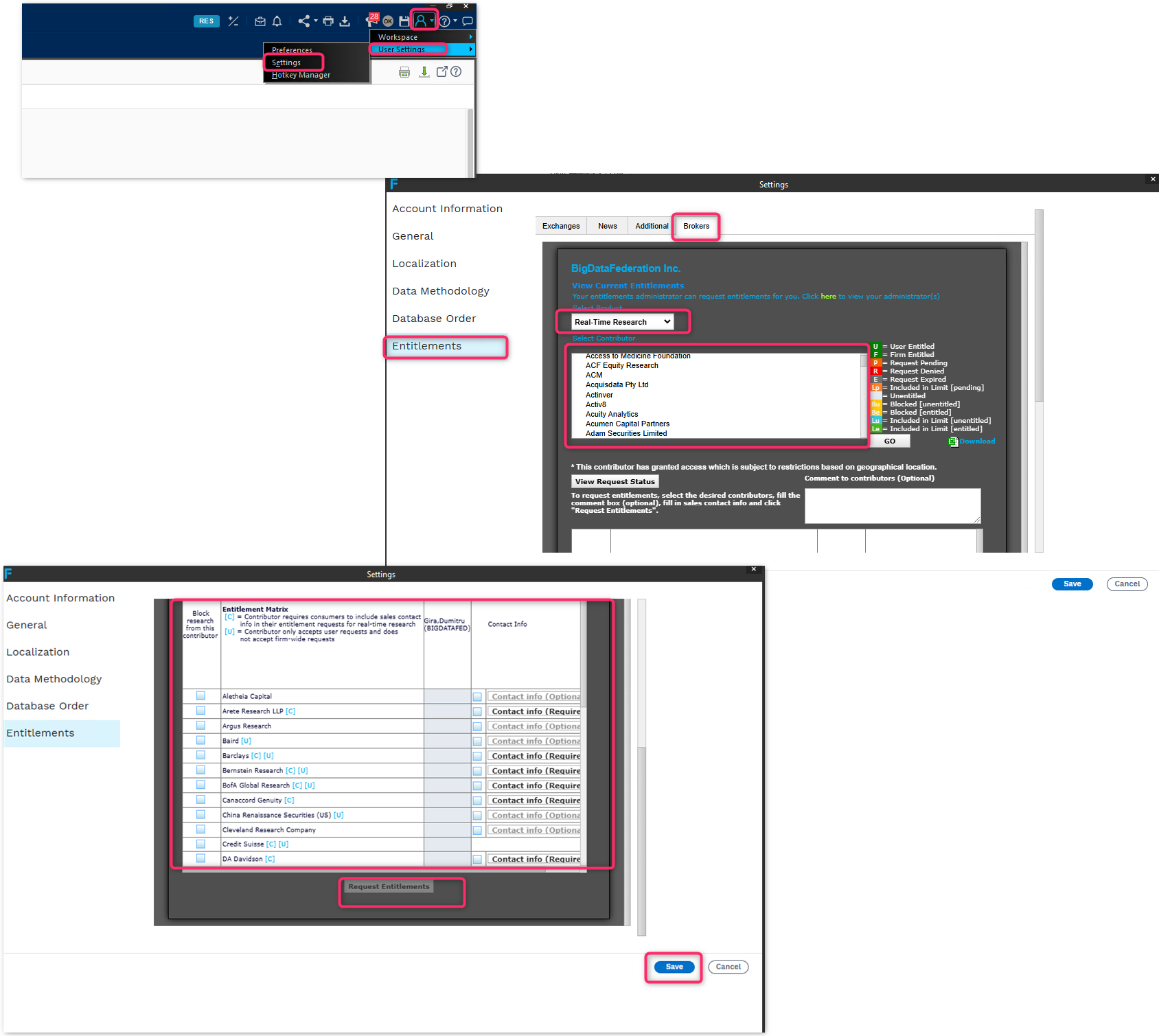
Request Entitlement to Financial AI®
In the FactSet Workstation, click the User/Settings icon in the top-right corner.
Select User Settings, then Settings.
In the Settings window, select Entitlements from the left-hand menu.
Select the Brokers tab.
Choose Real-Time Research from the product dropdown.
Find Financial AI in the contributor list.
Select Financial AI and click Request Entitlements.
Complete any required contact information and submit the request.
Click Save.
If you are already entitled to Financial AI®, you can skip this section.
Find Financial AI® Research
Open Document Search in the FactSet Workstation.
Select Research.
Click the Contributor/Analyst filter.
Search for Financial AI.
Select Financial AI to browse the available research reports.
If you have any issues, contact us at info@thefinancial.ai.
Reading our research on Bloomberg instead?